


You can receive payments from international clients in Nigeria in the currency each client already uses. A client in the US, the UK, Canada, or Europe pays you the same way they pay anyone in their own country, as long as you give them your Juicyway details for that currency. For Canadian dollars, you also add your client's email address to your whitelist in the app.
In short
- Give each client account details in the currency they pay in: a USD account for dollars, a GBP account for pounds, and a EUR account for euros.
- Each Juicyway currency account has its own account details, so a client in the US, the UK, or Europe pays you by an ordinary bank transfer in their own country.
- A client in Canada pays you in Canadian dollars by Interac e-Transfer, once you add their email address to your whitelist in the app.
- Clients and platforms outside the US can also pay into your Juicyway USD account.
- You can add your Juicyway USD account to Upwork as a Direct to U.S. Bank withdrawal method.
- You convert the money to naira in the app whenever you choose.
Which account you need
Your account should match the currency your client pays in.
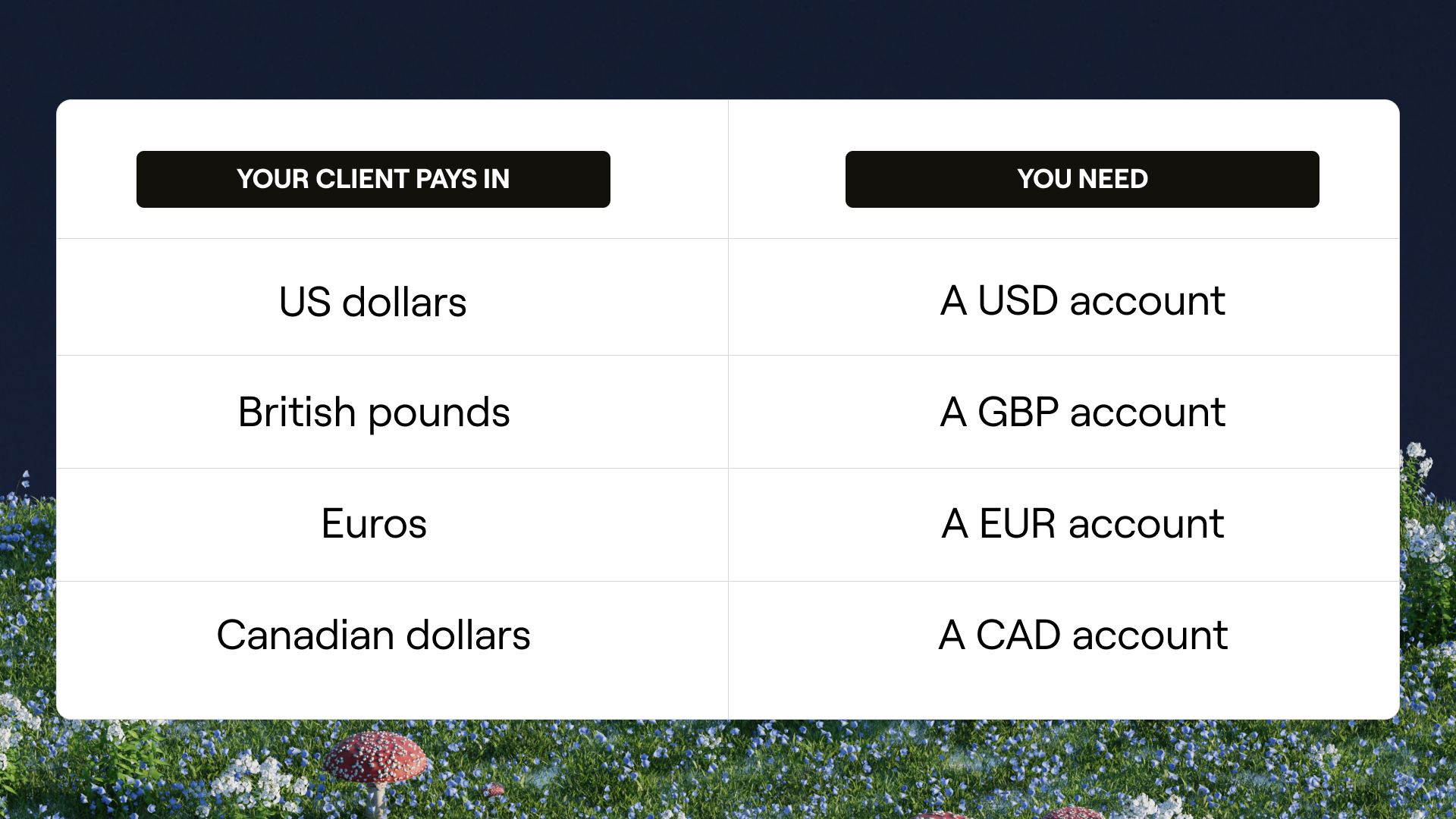
On Juicyway, you can have USD, CAD, GBP, and EUR accounts alongside your naira account. Your USD, GBP, and EUR accounts each come with account details for that currency. A client in the country or region that uses the currency pays you with those details the same way they pay anyone else there, so they don't have to work out how to pay into a Nigerian bank account. Canadian dollars come in by email address instead of account details.
What details to give your client
US dollars
Your Juicyway USD account comes with a US account number and a routing number in your name. The routing number is the nine-digit number that identifies a US bank. A client in the US uses those two numbers to pay you by ACH, the US network for electronic transfers between bank accounts.
Juicyway also supports FedNow, the Federal Reserve's instant payment service. When your client's bank or payment provider routes the transfer through FedNow, the dollars can arrive in as quickly as a few seconds, on any day of the week.
Clients outside the US can pay into your USD account too, and so can international platforms.
British pounds
Your Juicyway GBP account comes with a UK account number and a sort code, the six-digit number that identifies a UK bank. A client in the UK pays you by bank transfer, the same way they pay any UK account. These transfers go through Faster Payments, the UK system for online and mobile bank transfers in pounds. Pay.UK, which operates Faster Payments, says the money is usually available almost immediately and can sometimes take up to two hours.
UK banks use Confirmation of Payee to compare the name a sender enters with the name on the account they're paying, and to tell them whether it matches, nearly matches, or doesn't match. Give your client your account name exactly as it appears in your Juicyway app.
Euros
Your Juicyway EUR account comes with a bank account number your client uses for SEPA, the Single Euro Payments Area. SEPA is the system for euro bank transfers across 41 European countries. A client in any of those countries pays you by an ordinary euro bank transfer. Under SEPA's rules, the transfer goes through for the full amount, and each of you can be charged only by your own payment provider.
Canadian dollars
A client in Canada pays your Juicyway CAD account by Interac e-Transfer, Canada's service for sending money between bank accounts through online banking, using an email address instead of account details. First, add your client's email address to your whitelist: open CAD in the app, tap More, then Whitelist Email. Your client then sends an Interac e-Transfer from that email address to payments@juicyway.com, and Juicyway adds the Canadian dollars to your CAD account.
For dollars, pounds, and euros, share the details shown on that currency's screen in your Juicyway app each time.
Paying you without an international wire
A client in the US, the UK, Canada, or Europe doesn't need to send an international wire. ACH and Faster Payments are the domestic transfer systems in the US and the UK, Interac e-Transfer is a domestic service in Canada, and SEPA covers euro transfers across Europe. The payment method depends on the account your client pays into. Being based in Nigeria doesn't change it.
Withdrawing Upwork earnings
On Upwork, your client pays Upwork, and you withdraw your earnings to an account you add in your Upwork settings. Upwork's Direct to U.S. Bank method pays your earnings out by ACH, and you can add your Juicyway USD account as that method.
- Open a Juicyway account and verify your identity.
- Request a USD account, then copy your US account number and routing number from the app.
- In Upwork, go to Account settings, then Withdrawals, and select Set up next to Direct to U.S. Bank.
- Enter your Juicyway USD account number and routing number.
- Check that the name on your Juicyway USD account matches your verified name on Upwork.
- Confirm the account, then wait three days for Upwork to activate the withdrawal method.
- Choose Direct to U.S. Bank when you withdraw your earnings.
Add your Juicyway details before you need to withdraw, because the method becomes active only three days after you confirm it. Freelancers outside the US must complete Form W-8BEN on Upwork before they can withdraw. Upwork says ACH withdrawals arrive within two to five business days, and from September 1, 2026, it charges $2.99 on each Direct to U.S. Bank withdrawal when the freelancer's tax address is outside the United States.
Other platforms set their own withdrawal rules, including rules on names. Check a platform's rules before you add your Juicyway account to it.
When to convert to naira
You don't have to convert dollars, pounds, or euros to naira when they arrive. You convert them in the app when you want to, at the rate the app shows before you confirm.
You can also send from a currency account to any bank that accepts that currency, so you can pay a contractor who bills in dollars without converting to naira and buying dollars back. When you send from a currency account to a Nigerian bank account, the app converts the amount to naira for you.
Before you share your account details
- Currency: Ask which currency your client pays in, and share the details for that currency only.
- Account details: Copy the details from that currency's screen in your Juicyway app. For Canadian dollars, add your client's email address to your whitelist instead.
- Account name: Give your name exactly as it appears in the app. For pounds, UK banks compare the name your client enters with the name on the account.
- Payment method: Ask how your client plans to pay. ACH, Faster Payments, Interac e-Transfer, SEPA, and platform withdrawals each have their own timing and rules.
- Limits: For a large payment, check your daily and monthly limits in the app before your client pays. On a platform, check its withdrawal limits too.
Setting up your accounts on Juicyway
- Open a Juicyway account and verify your identity.
- Request a USD account. You need a USD account before you can request a GBP or EUR account.
- For pounds, open GBP in the app, tap Account details, tap Request account, confirm the request, and refresh the app.
- For euros, open EUR in the app and follow the same steps.
- For Canadian dollars, open CAD in the app, tap More, then Whitelist Email, and add your client's email address.
- Share the details for the currency your client pays in.
Your account details can appear in the app before the confirmation email arrives, so check the app once you've refreshed it. With these accounts in place, each client pays you in their own currency, and you convert to naira when you want to.
Key terms
ACH: The US network for electronic transfers between bank accounts. Upwork's Direct to U.S. Bank withdrawals go through ACH.
Routing number: The nine-digit number that identifies a US bank. A US sender needs it alongside your account number.
FedNow: The Federal Reserve's instant payment service, which moves money between US banks at any hour, on any day of the year.
Sort code: The six-digit number that identifies a UK bank. A UK sender needs it alongside your account number.
Faster Payments: The UK system for online and mobile bank transfers in pounds.
Confirmation of Payee: A UK name check. The sender's bank compares the name they enter with the name on the account before they pay.
SEPA: The Single Euro Payments Area, the system for euro bank transfers across 41 European countries.
Interac e-Transfer: Canada's service for sending money between bank accounts through online banking, using an email address.
Frequently asked questions
Can I receive payments from international clients in Nigeria?
Yes. On Juicyway you can have USD, CAD, GBP, and EUR accounts. Clients in the US, the UK, and Europe pay into your USD, GBP, and EUR accounts by an ordinary bank transfer in their own country, and clients in Canada pay your CAD account by Interac e-Transfer.
Do I need a separate account for each currency?
Yes. Each currency is a separate account with its own details. Share the details of the account that matches the currency your client pays in.
Can a US client pay me in dollars?
Yes. Your Juicyway USD account comes with a US account number and routing number, and a US client can pay you by ACH with those details.
Can a client outside the US pay into my USD account?
Yes. Clients and international platforms outside the US can pay into your Juicyway USD account.
Can a UK client pay me in pounds?
Yes. Your Juicyway GBP account comes with a UK account number and sort code, and a UK client pays you by Faster Payments with those details.
Can a client in Europe pay me in euros?
Yes. Your Juicyway EUR account comes with a bank account number for SEPA transfers, and a client in any SEPA country pays you by an ordinary euro bank transfer with it.
Can a client in Canada pay me in Canadian dollars?
Yes. Add your client's email address to your whitelist in the app. Your client then sends an Interac e-Transfer from that email address to payments@juicyway.com.
Does my client need to send an international wire?
A client in the US, the UK, Canada, or Europe doesn't. They pay you by ACH, Faster Payments, Interac e-Transfer, or SEPA, the ordinary transfer systems in those places.
Can I withdraw Upwork earnings to Juicyway?
Yes. You can add your Juicyway USD account to Upwork as a Direct to U.S. Bank withdrawal method. The name on the account must match your verified Upwork name, and the method becomes active three days after you confirm it.
Do I have to convert the money to naira when it arrives?
No. You convert it to naira in the app whenever you choose.